


How To Play Multiplayer Games On Ppsspp With Friends Like Pes And Tekken
June 30, 2022Does PPSSPP Support Two 2 Players?
How to connect PPSSPP for multiplayer on android has always been one thought that will never skip roms players on ppsspp emulator. When playing games on the play station console, there are always two pads for multiplayer purpose. Lacking multiplayer mode in ppsspp emulator for mobile devices would be a very disturbing issue, but thanks to the ppsspp emulator creator, there's support for multi-playing.
Can android players play multiplayer games on ppsspp? Yes! You can play PPSSPP with 2 or more players. You can use the settings to play PPSSPP games with two or more players.
The ppsspp multiplayer feature allows two or more players to play together on various PPSSPP multiplayer games. With ppsspp multiplayer, now you can have fun and compete with your friends on various PPSSPP games. This feature will be very essential especially, for those who do not have a PlayStation console at home.

The ppsspp multiplayer now gives you the space and portability to play and compete with your friends anywhere and at ease. Moreover, since you are using your device, the in-game controls and gameplay become convenient for you.
The method can be used to play any PPSSPP multiplayer games like PES 2016, PES 2018, PES 2019, PES 2020, PES 2021.
The settings also apply to other PPSSPP games like Naruto. You can play other multiplayer player games like Tekken 6, Mortal Kombat, WWE SmackDown vs Raw, WWE Smack down vs Raw 2011 WWE 2K17 PPSSPP, WWE 2K18 PPSSPP, Need For Speed NFC, Fight Night Round 3 and other PPSSPP multiplayer games.
- Also Download Best Ppsspp Horror Games
- See Also: Unique Differences Between GTA SA and Its Alternative
In here is a simple guide on how you can play PPSSPP multiplayer games with your friends using multiplayer mode. But first, you should want to know the requirements for it. Lucky for you, they are not much.
Basic Requirements In order To Connect PPSSPP Multiplayer
- PPSSPP emulator app.
- You must have at least 512MB of RAM and enough storage space
- Android Phone with Portable WI-FI Hotspot.
- Android phone functioning WI-FI.
- And also try avoiding cheats while in multiplayer mode, it could cause hangs, but it does work.
Steps To Take To Connect And Play Multiplayer PPSSPP Games
How to play ppsspp multiplayer is very simple. If you follow the steps as given, carefully, you can play any ppsspp multiplayer ad hoc game in your ppsspp emulator app.
This particular settings applies more to PES games. Should you want to try it with other games, follow the same format of connection, and open a room using the Adhoc mode in any game. The ADhoc means multiplayer. If you find it in any game, it means you can play multiplayer with the game.
Steps:
- Turn on your Android’s Portable WI-FI Hotspot, and tell your friend or whoever you want to play with to turn on their Wi-Fi and connect.
- After that, both of you should launch the PPSSPP emulator app. Don’t open the game you intend to play yet.
- While on the PPSSPP app menu, Go to the PPSSPP’s SETTINGS.
- Click on "Networking"
- Enable networking/WLAN– Check or tick the same function as PSP’s Wlan Switch.

- MAC address- click on change MAC address to generate random MAC addresses. Make sure both players use different MAC address. Though it does work when both players use same Mac address, but it might not really perform well when using the gold ppspp app.
- Enable Built-in PRO Adhoc Server- Tick only if you’re the host (the phone that enabled Portable-Wifi-Hotspot).
- Connect PPSSPP multiplayer.
- After that, start the game. If it lags, use and increase 'Frameskip.'
- After that, go to pes match selection and loading menu, and look for where you have the Adhoc multiplayer option, and then select it as can be seen in the PES 2016 game screen as seen below.
Chose or select Adhoc by pressing X button.
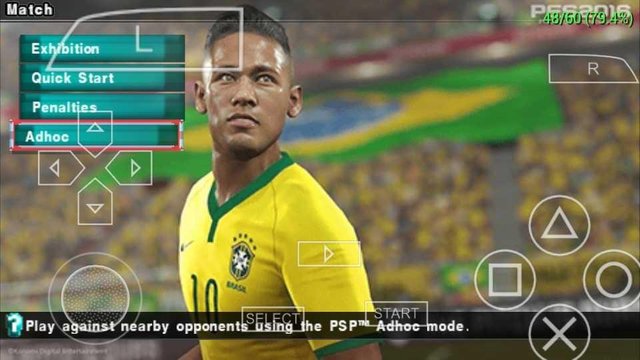
The host should "Make Room" while the other player should Search For "Match Room" as it will appear in the next screen after clicking on the adhoc button.
Connect PPSSPP multiplayer
Make sure you are the one setting up the room if you are the one who turned on the hotspot, i.e. the host. The other player should Search For Match Room. Always remember that the host is the one that turned on his hotspot, while the other player connected via WiFi. It could get simpler if you create the hotspot and WiFi connection between you and your friend before opening the ppsspp emulator app.
After successfully setting up the room, choose your preferred teams and enjoy the multiplayer mode.
How To Fix PPSSPP Multiplayer Connection Issues
There are usually some delays in the connection. In some cases, while trying to connect the ppsspp multiplayer mode with your friend, you might experience some connection issues like the 'unable to find host' or 'host unable to create room'. The issue sometimes could be from your end or may not.
- To confirm the problem isn’t from your end, simply recheck the ppsspp emulator multiplayer settings used above just in case you may have made a mistake with the settings.
- If everything’s ok with the settings, but the issue still persists, do this to fix the ppsspp multiplayer connection issue.
- Though the connection do take time in some cases where the phone network connection is not strong, to fix it, simply exit the ppsspp emulator app alongside your friend.
- Turn off your hotspot, and friend's wi-fi.
- After that, turn on your hotspot and ask your friend to turn on his or her wi-fi and connect.
- After creating the connection, open the ppsspp emulator app and start the game.
- Go to Match and to where you find the Exhibition, other options, and the Adhoc option as seen in the image above.
- Create or make a room and the other player should Search For Match Room.
- Once connected, proceed to team select and enjoy your ppsspp multiplayer game.
How To Connect Tekken 6 Multiplayer PSP Game
How to play tekken 6 multiplayer on ppsspp is a very simple process. It is similar to the one above, but has very slight difference. I made this article earlier to help people who would like to play Tekken 6 game with friends using the multiplayer mode, adhoc, but as of today, May 24th 2022, I have decided to add a link to where you can download Tekken 6 psp game for your ppsspp emulator app. Read down to where you can download the game. And before we get to the step by step guide on how to play multiplayer in Tekken 6 ppsps game with your friend or brother or relations, What is Tekken?
 |
| Tekken |
- Best apk android games
- Did You Know You Can Play Any Game On Any Device Be It Windows, Android, Or iOS? Read How
Tekken game is an action arcade video game. Teken is developed by Bandai Namco Studios, and is published by Bandai Namco Entertainment.
Also Read: Best Online Multiplayer Apk Games You Can Download Like Call Of Duty Mobile And PUBG Mobile.
Tekken games are one the psp games known for 1 vs 1 combats and fights. In Tekken ppsspp game rom file, while playing, you could perform lots of actions with the aid of it's control system.
Since Tekken is a fighting PPSSPP game, you can throw punches, block punches, dodge and escape punches.
You will definitely want to know if you can win your friends in the fight, or can they win you? That's why there's is a multiplayer mode in some psp games for offline multiplayer game challenges. Now let's see how to go about the multiplayer.

What Do You Need For Playing Multiplayer Offline On Games In Ppsspp?
First of all you will need to connect your friends phone to yours using an android phone hotspot and wifi. If you turn on your hotspot for your friend to connect, you are known as the host, and your friend who connects is the guest.
How To Connect Phones For Multiplayer Tekken 6 Gameplay.
This settings is to be applied in the guest's android phone.
- See Good Android Phones For enjoyable Gaming
After the connection, open your ppsspp emulator app,the ppsspp gold apk app preferably. If you happen to open the ppsspp game app for the first time, you will have to allow the permission for the app to have access to your android phone's storage. There your game progress will be saved and ran.
I hope you do have and find the tekken 6 ppsspp game file in your ppsspp emulator. If you don't, and don't know how to find it, this <<How To Play Ppsp Games>> article could be of help.
Follow The Steps:
- In the psp emulator home page, you should find your already owned ppsspp game files reflecting alongside other ppsspp emulator options like settings.
- Head to the ppsspp SETTINGS that is alway at the right side of the ppsspp emulator home page.
- After that click on the NETWORKING option.
- In the next option below, ENABLE BUILT-IN-PRO AD HOC SERVER.
- Change the IP address that is usually nicknamed "coolbird" in the ppsspp gold emulator to a valid IP address of your choice, but you could ttry the IP address, 192.168.143.1 as was recomemnded by Dinker.
- After that, click and check the tick box right above you with the option, "ENABLE NETWORKNG/WLAN(beta, may break games"
- Click on the option below with the tittle, "PORT OFFSET(0#PSP compatibility)and set the limit to 5000, and click on OK to save.
- Read Also: Popular Ppsspp Games For Download
- When you are done, go to the next ppsspp settings option with the tittle, SY
- STEM. You will find the option "1/0 timing method". Click and select or check the first option you find, "FAST(lag on slow storage)" DO ALL THESE IN YOUR PHONE AS THE GUEST!
Settings For The Host
- Remember, the host is the person who turned on his hotspot for ppsspp multiplayer connection.
- Here are the settings you should set up as the host:
- Head to the NETWORKING option like in the guest settings for multiplayer ppsspp game connection.
- Select and check the ENABLE NETWORKING/WLAN option.
- DOWN to the next option, change the IP ADDREESS from the 'coolbird' name to the same IP address as the guest.
- Then in MAC ADDRESS, click to change the mac address. You can make it same with that of the guest for a smoother game play. Moneyedugame.com
- In the next option which is the PORT OFFSET, like the guest setting, increase it to 5000.
- Still in the ppsps settings, click on the setting option, SYSTEM and and set the 1/0 as that of the guest.
Play Tekken 6 Multiplayer
You are almost there! Go back to the pspp menu or home page where you have the game icons displaying. Launch or open the tekken game alongside your game partner or friend.
After opening the teken game, and you are both in the START screen after pressing the start button, head to the options aligned in the left, scroll till you can find NETWORK, and then click on it. Available players will be displayed in the next screen for multiplaying, both of you should Click the X button to choose your available friend.
When connected you can now enjoy your multiplayer game on the ppsspp app.
Some games require another kind of method for connection of multiplayer games. You can read down to know another method, though the connection settings are similar as in Tekken 6 Multiplayer PSP Game.
Some Android sports games you could download
You can still apply this method while using windows ppsspp gold emulator for multiplayer gaming.
Download Tekken 6 PSP Game
Tekken 6 psp game download requires simple steps to having it in your phone. To download the game, visit this psp ROM game link. The ppsspp game download page will open, with a Tekken 6 game image. Below the image, you will find a "save game" button. Press or click the button to start downloading the game to your phone.
You should know the next step to take after downloading the game in order to successfully have the game opened and running in your ppsspp gold or blue emulator app. If you don't, search this blog using the search form up above to search on the article, "How To Play Ppsspp Games", and then click to read on the step by step guide on how to connect ppsspp game to the ppsspp emulator app for playing sake. The link to the article is also attached in this article if you should check the link texts above.
More Interesting Topics From HomePage


0 comments